Fast response
Shape transients and bring instruments forward with responsive compression.
FET-INSPIRED DYNAMICS
Fast. Punchy. Full of character.
A compressor inspired by the attitude of classic FET dynamics, designed to bring energy and control to your mixes. From gentle leveling to bold, expressive compression.
Free plugin · Donations optional
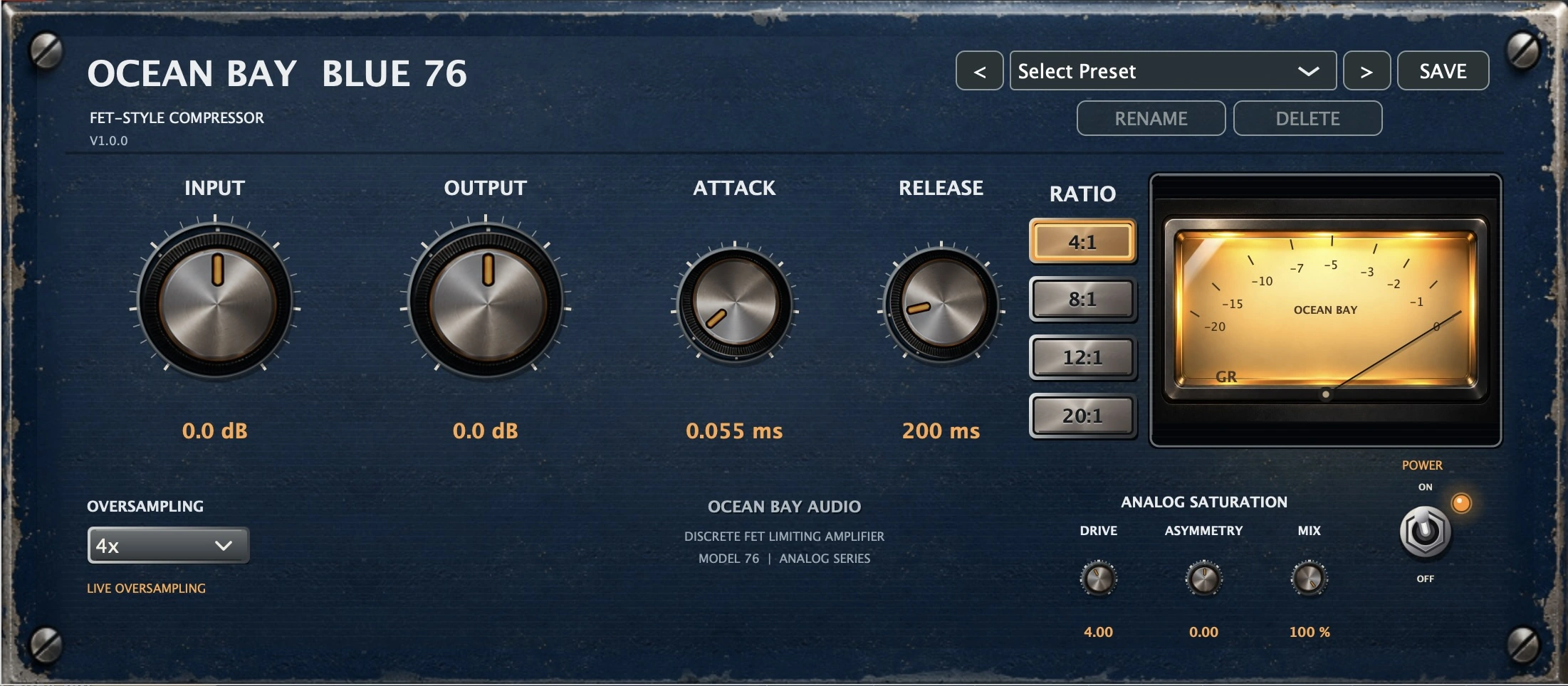 Actual Blue 76 interface · V1.0.0
THE SOUND
Built for creative dynamics processing, Blue 76 brings the spirit of classic FET compression into a straightforward workflow.
Shape transients and bring instruments forward with responsive compression.
Use it for gentle dynamic control or a more assertive, energetic sound.
A focused tool for drums, bass, guitars, vocals and creative production.
THE CONTROLS
Four selectable compression ratios.
Adjust the compressor’s timing to your source.
Drive, Asymmetry and Mix controls.
Selectable oversampling directly from the interface.
Save, rename and manage your settings.
Monitor gain reduction on the illuminated meter.
GET THE PLUGIN
Download Blue 76 for macOS or Windows. No account or donation required.
macOS · AU / VST3 (verify host compatibility)
DOWNLOAD INSTALLER ↓Version 1.0.0 · installer available
Windows x64 · VST3 (verify host compatibility)
DOWNLOAD INSTALLER ↓Version 1.0.0 · installer available
Official installer files are included with this website. Blue 76 is free; donations are optional.
SETUP GUIDE
Choose your operating system for the installation instructions. Check the release notes before installing.
Only install packages you trust. Do not disable macOS security protections to run an unverified installer.
Windows support and system requirements are not yet verified. Do not install files from unofficial mirrors.
System requirements, supported hosts, architecture and installer signatures will be published after release validation.
SUPPORT INDEPENDENT AUDIO
If Blue 76 earns a place in your sessions, you can help support future Ocean Bay Plugins development. A contribution is always optional.